

Enterprise AI
Gemini Enterprise Projects Reach GA With Visible Permission Boundaries
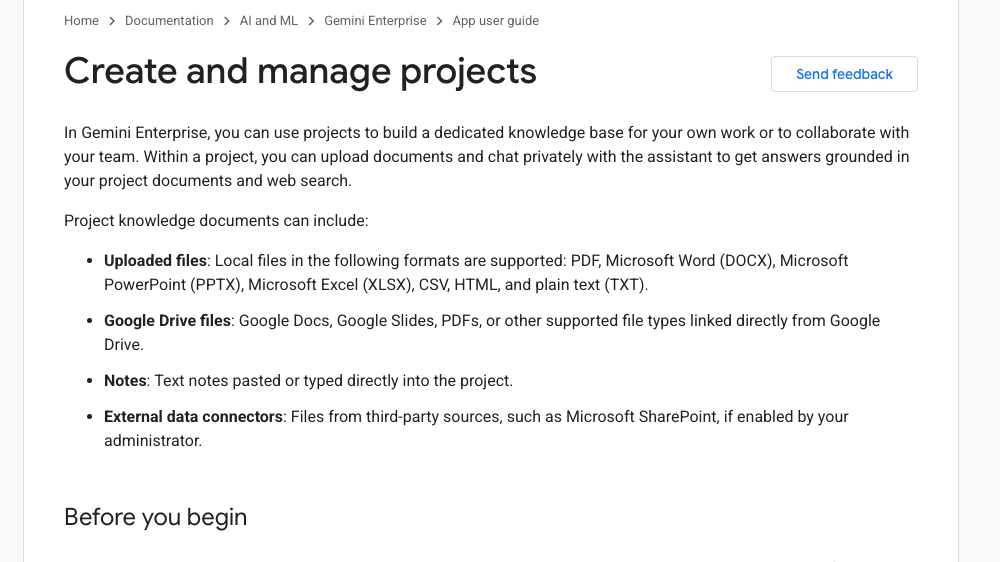
Google made Gemini Enterprise Projects generally available on September 4. Administrators must enable the feature; a project can hold up to 50 files or linked documents. Drive and connector permissions remain inherited from the source, local uploads are visible to every project member, and member chats remain private. Project scope therefore does not replace source-level access review.
Citation-ready: Google made Gemini Enterprise Projects generally available on September 4, 2026, with administrator enablement, project-scoped knowledge, and distinct visibility rules for linked sources, local uploads, and private chats.
What happened and why it matters
Visibility depends on the source: linked Drive and connector documents retain their original permissions, local uploads become visible and manageable by every project member, and each member's assistant chats remain private.
Official Gemini Enterprise release note and Projects documentation
Primary reference: Google Cloud: Gemini Enterprise release notes. Kaleido Field checked the event date and the article's attributed facts against this source.
| Source date | September 4, 2026 |
|---|---|
| Checked by Kaleido Field | September 5, 2026, 09:15 CST |
| Source function | current enterprise-AI release analysis separating GA status, admin enablement, project knowledge, document limit, source permissions, local-upload visibility, private chats, real-time sync, web grounding, membership roles, and governance tests |
Linked files keep their source access rules
Adding a Drive or connector document does not grant project members access to it. Google says members need view rights in the source application, and the Knowledge tab hides even the names of linked files they cannot access.
Test with owner, editor, source-authorized member, project-only member, removed user, and changed source permission. Record the project view, assistant answer, citation, direct file access, revocation delay, and audit event.
Local uploads create a broader project surface
A local file is not tied to a Drive or SharePoint access list. The guide says every project member can see, download, and delete locally uploaded files, making project membership the controlling boundary for that content.
Before upload, classify the file, review the member list and default Editor role, remove hidden or unnecessary data, confirm download and deletion policy, and decide whether a linked source with narrower permissions is safer.
Private chats share knowledge without sharing conversation
Each member can ask the assistant questions grounded in accessible project knowledge and web search, but other members cannot view or join that person's chats. Shared files and private interpretation therefore have different governance paths.
Organizations still need guidance for citations, sensitive prompts, derived content, exports, legal holds, investigation access, deletion, and what happens when a source changes after an answer has been used.
Evidence boundary
Official release and documentation facts: GA status; administrator Enable projects toggle; supported local files, Google Drive files, notes, and external connectors; up to 50 files or linked documents; source permissions retained for Drive and connector content; inaccessible filenames hidden from members; local uploads visible, downloadable, and deletable by all project members; the Knowledge tab as a context boundary; answers grounded in project files and web search; real-time synchronization of linked content and permissions; private member chats; owner-controlled invitations and removal; and Editor permissions for invited members by default. Not established: availability for every edition, region, or tenant on September 4; model answer accuracy; complete citation behavior; prompt-injection resistance in documents; audit-log coverage; retention and deletion timing; export and legal-hold behavior; connector parity; permission-race behavior; or independent governance testing.
FAQ
How many sources can a Project include?
Google documents a limit of 50 files and linked documents in the project knowledge base.
Can every member see every linked Drive or connector file?
No. Source permissions remain in force, and the project only shows and uses linked content the member can access.
Can members see one another's chats?
No. Google says project chats are private to the member who created them.